The departure board at the stop, explained
Tap a stop and you get the departure board from there. Here is what each part of it means.
Zoom in on the map and the stops appear: bus stops as map pins with a bus, train, tram and ferry stops as coloured dots. Tap one and you get the departure board from there, as it appears on the screen at the stop. Here is what each part of the board means.
What the board shows
The board shows the next 15 departures from the stop within two hours, sorted by when they leave. Each row has:
- The line number in a coloured label. The colour shows the type: green for bus, purple for tram, red for train, turquoise for ferry.
- The direction, as it appears on the sign on the front of the bus, for example "Lund via Kolstad-Heimdal".
- The platform, when the stop has several. It is the letter or number on the sign at the stop, for example "P1" or "2". If no platform is shown, the stop has only one.
- The time: "now" and "4 min" for the next 15 minutes, then the clock time.
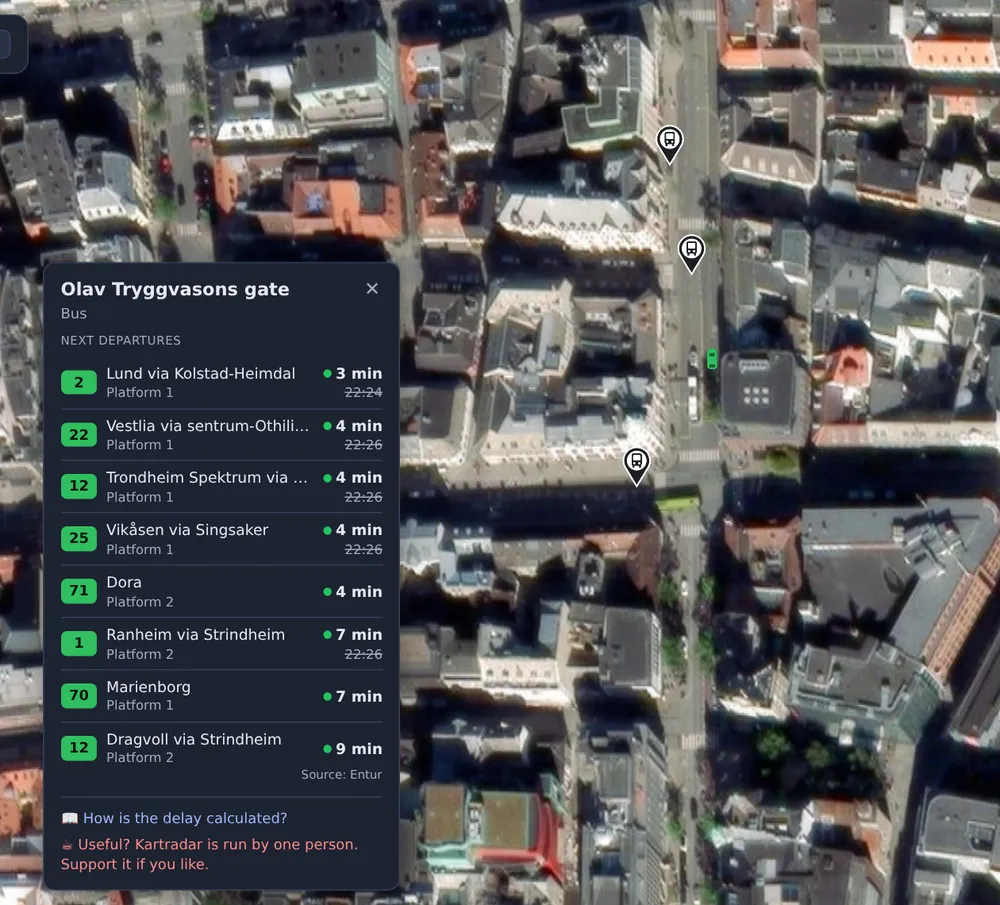
The board updates itself every 30 seconds as long as it is open.
Real time and scheduled time
A green dot in front of the time means the time is real time: an updated estimate based on where the bus actually is. Without the dot, the time is the timetable, because the company has no real-time data for that particular departure. This typically happens when the bus has not started its trip yet, or when the equipment on board is not transmitting.
If the bus is at least one minute late, the original scheduled time is shown crossed out below the new time. You then see both when the bus was due and when it is now expected.
Cancelled in red means the company has reported the departure as cancelled. The row stays, greyed out, so you can see that it is not coming, instead of it just disappearing.
In Oslo too
In Oslo and Akershus, buses, trams and the metro are not shown as symbols on the map, because Ruter does not share their positions. But Ruter does send departure times in real time, so the departure board works there too. Tap Jernbanetorget and you get the next metro, tram and bus with updated times. Why the positions are missing is explained here.
When the board is empty
- "No departures in the next two hours" means exactly that. It is common late in the evening and at stops with few departures.
- Some stops in the register are only used by school buses, on-demand transport or in season, and have long periods without departures.
- If you get an error message, Entur did not respond in time. Try again shortly.
Where the data comes from
The stops come from the national stop register, and the departures from Entur's journey planner, the same data the screens at the stops and the travel apps use. Kartradar changes nothing in the times, but shows them on the map where you already see the buses.
If you would rather see where a particular bus is right now, tap the bus instead. How to follow your bus in real time.