How to follow your bus in real time
Twelve county transport companies send their bus positions. Here is how to find your bus on the map, and where it does not work.
Standing at the stop and wondering where the bus is? You can see it on the map: a green symbol moving along the road, with line number, direction and how late it is running. It works in most counties. Here is how to find your bus, what the numbers mean, and where it does not work.
Where buses are shown
Bus positions come from Entur, where the county transport companies submit where their vehicles are. On a Monday afternoon in October 2026 we counted buses with a position from these companies:
| Company | Area | Buses with a position |
|---|---|---|
| Skyss | Vestland | 529 |
| AtB | Trøndelag | 295 |
| Kolumbus | Rogaland | 194 |
| AKT | Agder | 190 |
| Svipper (Troms fylkestrafikk) | Troms | 168 |
| VKT and Farte | Vestfold and Telemark | 158 |
| Brakar | Buskerud | 123 |
| FRAM | Møre og Romsdal | 122 |
| Østfold kollektivtrafikk | Østfold | 120 |
| Innlandstrafikk | Innlandet | 111 |
| Reis Nordland | Nordland | 95 |
| Snelandia | Finnmark | 43 |
The number varies through the day: few buses run at night, most in the rush hours. Vy's regional and express buses are shown as well.
Oslo and Akershus are missing. Ruter sends departure times, but not the positions of its buses, trams and metro. Oslo's city buses therefore do not appear on any open real-time map. The measurements that show this are here. Departure times from the stops still work in Oslo too, see below.
How to find your bus
- Search for the line number. Type for example "3" in the search field at the top of the menu. Buses on that line in the area you are looking at are highlighted on the map.
- Tap the bus. The panel shows the line, destination, the company operating it, delay and speed, and the list of stops it has left, with the expected time at each.
- See the route. The stretch the bus will drive is drawn on the map and shrinks behind it as it goes. Stops it has passed disappear from the list.
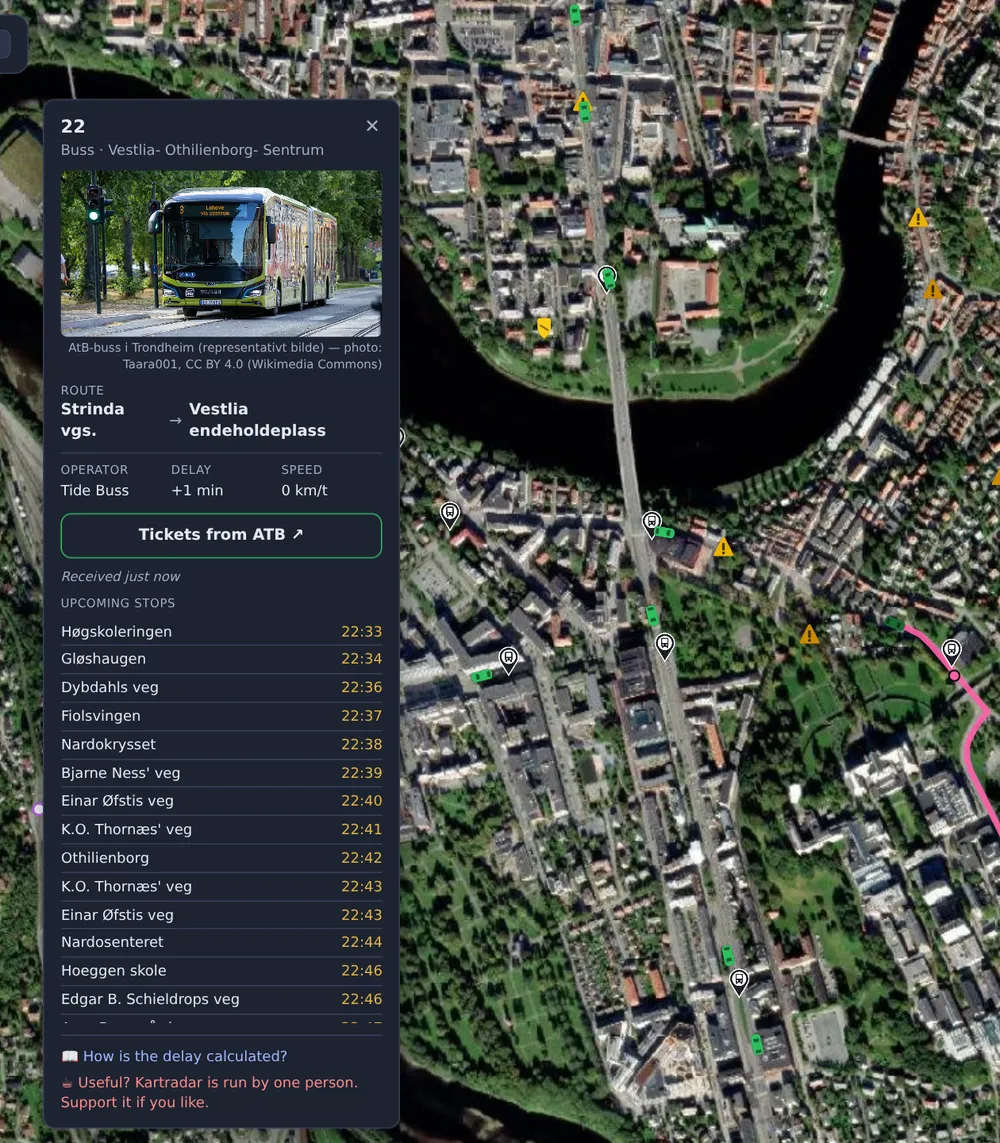
If you know which stop you are leaving from, but not which bus comes first, it is quicker to go the other way: zoom in to the stop and tap it. You then get the departure board with the next buses from there. How to read the departure board.
What "+4 min" means
The delay is the difference between the timetable and the updated estimate the company calculates from where the bus is now. If the bus is ahead of schedule, the number is negative. The estimate is recalculated continuously, so it can change while you are watching. The full explanation is in the guide to delays.
Positions are fetched every 30 seconds. Between two updates, the symbol glides along the road so the movement does not stutter. That is smoothing of the last known position, not a new measurement.
When the bus is not shown
- The bus is not transmitting. Some vehicles are not connected to the system, or the equipment on board is down. The bus is then in the timetable, but not on the map.
- The bus has not started its trip. A bus waiting at the terminus may be listed on its previous trip or on no trip, and is then shown without a route.
- You are looking at the wrong area. The search finds buses in the map view. Zoom out, or move the map to where the bus runs.
- The company does not share positions. Today that applies to Ruter in Oslo and Akershus.
Use it on your phone
The map works in the browser, but it is quicker to add it to your home screen as an app: one tap and you are straight into the map. How to do it on Android and iPhone. If you tap 🧭 "Follow me", the map stays where you are, so you see the buses around you without searching.